[ OVERVIEW ]
My inbox was full. The notification that started this is a familiar one, and the usual answer is to buy your way out of it: pay for more storage and carry on with a bigger mess. This time I had another idea.
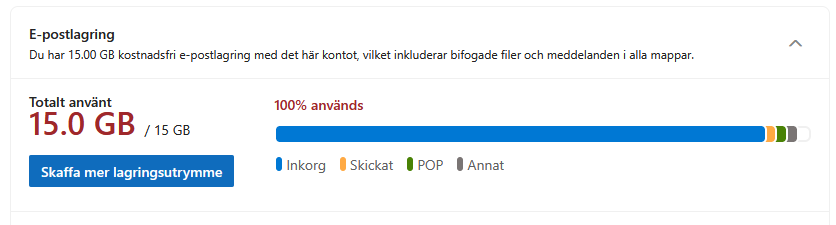
The mailbox had 84,612 messages in it, going back to about 2013. Almost all of it is newsletters, marketing, and social notifications I have never read and never will. But a fair amount is worth keeping, including things going back years, so the goal was to keep everything of interest and get rid of what I will never open.
One thing shaped every decision after that. If I keep a message by mistake, it costs me a glance. If I delete one by mistake, it is gone. That sounds obvious. It still changed how I built this, and it changed what I measured even more.
A large language model can judge an email about as well as a person can, but running one over 84,000 messages is slow and costs money. So instead, a large model labels a sample, a small model learns from those labels, and the small model does the rest on my own machine. It takes seconds, and it costs nothing.
[ HOW IT WORKS ]
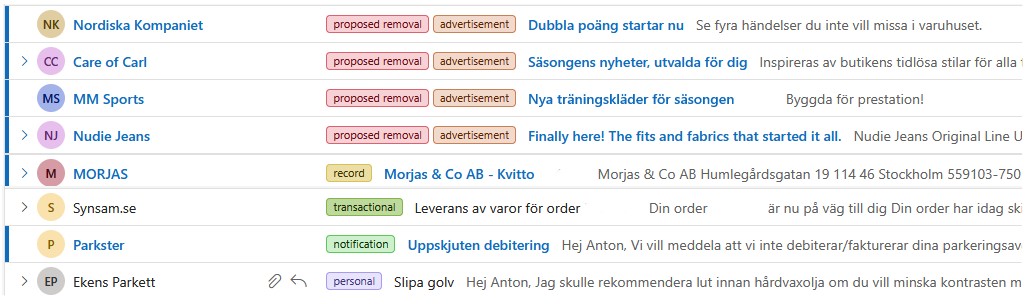
It is a small program that works through the mailbox and does exactly one thing: it puts a label on each message. The important part is what it does not do. No language model ever interacts with my inbox by itself. The model only reads a message and labels it. Writing those labels back to the mailbox is done by ordinary code, which never looks at what a message says. Nothing is moved, and nothing is deleted, by the model itself.
In practice that is all it needs to do. Once every message carries a label, sorting by label in Outlook lets me look at and clear a whole category at once, which is a completely different job from working through 84,000 messages one at a time.
The same pipeline can be pointed at incoming mail rather than a one-off backlog, writing the labels back to the inbox through the API as messages arrive. That way the mailbox stays sorted instead of needing another clean-up in two years.
[ WHY NOT JUST USE AN LLM FOR EVERYTHING ]
Using a large model to label a sample, training a small model on those labels, and then running that over the mailbox is probably overkill if all you want is a clean inbox. Paying the large model to label everything would have been far less work than building and testing all of this.
I did it this way because the comparison was the interesting part. I wanted to find out, on a real task with real mess in it, how fine-tuning a small language model stacks up against a traditional machine-learning approach that does not use a language model at all. Cleaning out the inbox was the excuse; I would not have spent the weekend on it otherwise.
[ THE METRIC THAT ACTUALLY MATTERS ]
Accuracy is the wrong target here, and it is worth being clear about why. Most of this mailbox is advertisements. A model that answered “throw it away” to everything would score well on accuracy while cheerfully proposing to delete plenty of mail I would want to keep. That is a failure I want to avoid.
So the number I watch is not just accuracy. It is how much real mail ends up in the removal pile: of the messages marked for removal, how many are things a person would actually want to keep.
It is a good illustration of something worth remembering. You have to understand what your data really looks like and what the real-world cost of being wrong is, because that is what tells you which number to watch closely. Optimising the obvious metric would have produced the wrong system here, one that looked better on paper while being worse at the only thing that mattered.
[ WHY SMALL TRIALS FIRST ]
The most useful habit in this project was running things small before running them at scale. This is the clearest example of why.
80% of every message was tracking links
Marketing email wraps its links in tracking code, and that code was most of the text. On a sample of 800 messages, 4.69 million pieces of text dropped to 830,000 once it was removed.
I had looked through a handful of messages by hand before this and seen nothing unusual. That is because most mail clients collapse those tracking links into a few tidy words, so the mess is invisible on screen. It only showed up when I stopped looking and actually ran something over the whole sample and counted.
Removing it made the labelling both cheaper and better: there was about 39% less text to send, and the model could reuse more of what it had already worked out. It also barely changed the answers. Across 15,000 messages that could be compared, 2.6% of categories moved, and most of those moved toward keeping.
Build the thing, run it over a hundred messages, and check it behaves the way you assumed before you point it at tens of thousands. Nearly everything that went wrong in this project was found that way, and none of it was visible by reading the code.
[ OLD TOOL VS NEW TOOL ]
This is the part I found most interesting, so it is worth explaining both sides properly.
A method from the 1970s called TF-IDF. It looks at which words, and fragments of words, appear in a message, and weights each one by how unusual it is across the whole mailbox. A word like “unsubscribe” that appears everywhere counts for almost nothing; a word that is rare overall but keeps turning up in one kind of mail counts for a lot. That summary then goes into a logistic regression, one of the simplest and oldest classifiers there is.
Take a modern language model and fine-tune it on the same labelled messages. This is the approach most people would reach for today. It works because the model has already been trained on an enormous amount of text, so it arrives with a general understanding of language and only has to learn this particular job. Models of this kind, scaled up far larger, are what power assistants like ChatGPT and Claude.
TF-IDF has no understanding of meaning and no grasp of grammar, and it knew nothing about language before I pointed it at my inbox. I fed it fragments of words rather than whole words, which matters in a mostly-Swedish mailbox: it is what lets the model treat faktura, fakturor and fakturan as the same word without ever being told they are related.
The old tool won. The fine-tuned language model came out behind on my test data. TF-IDF has no limit on how much text it reads, so it takes in the whole message at once, which means it sees everything the large model saw when it produced the labels. It is also the cheaper and faster of the two to run.
I expected the modern approach to win. That is the value of actually testing and comparing things rather than assuming you already know which one is better.
[ WHAT DIDN’T WORK ]
Alongside that, I tried adding several other features to the model. Every one of these looked like a good idea, and every one of them was measured and dropped:
| IDEA | RESULT |
|---|---|
| Turning each message into an embedding vector with a small language model | No better than the simpler method, and worse at keeping real mail out of the set that would be removed |
| Using the sender’s domain as an input | Worse |
| Sender history, meaning how many messages arrived from this sender before this one | The most obvious idea of the lot, and the worst of them |
| Details from the headers: unsubscribe link, read or unread, attachments | Worse, despite an unsubscribe link being present on 79% of messages |
| Adding the subject line | Worked, a small gain that held up when I tested it properly |
[ HOW GOOD IS IT, REALLY ]
The small model is imitating the large one, so it cannot be better than the large one. That is the ceiling on this whole approach: the best it can do is match its teacher. So the real question is whether the teacher is good enough, and in my opinion, it is. The large model is reliable on this kind of mail, so the ceiling sits high enough that it is not what is limiting the result.
The more useful answer came from reading the awkward cases by hand. The very few messages that could have been kept but were marked for removal are genuinely ambiguous. Several of them I could not confidently categorise myself. When a person cannot say what the right answer is, a model getting it “wrong” is not really a model failure.
So the honest position is that this is about as good as the problem allows. Not perfect, but on the two realistic alternatives it is not close. Deleting old mail in bulk without looking is quicker and much worse: it is the one approach that can genuinely destroy something that mattered. Reading 84,000 messages myself would be more accurate in principle and is completely impractical.
The choice was never between this and something perfect. It was between this and either deleting blind or never doing it at all.
[ RESULT ]
So the shape of it: 84,612 messages in the mailbox, 15,000 of them labelled by the large model, 10,000 of those used to train the small model with 5,000 held back to test it, and that small model then labelled 67,682 messages on its own.
Running it costs nothing per message and takes just a few minutes for the whole mailbox, on my own machine. Nothing has been deleted: the output is a set of labels, and sorting by them is what makes the cleanup quick.
[ CLOSING NOTE ]
None of it would have been possible without large language models. They are what made labelling tens of thousands of messages realistic. I would never have labelled the training set by hand, whatever tools I had, and you cannot train a classifier without labels. The large model produced the training data; a simpler, older model learned from it.
And the older methods earn their place in that story rather than being replaced by it. The model I actually shipped is a traditional one, and it beat fine-tuning a modern language model on the same labelled data. It is also cheaper and faster to run, with no cost per message. The lesson is not that one approach wins. It is that language models are exceptionally good at producing the data that makes the cheaper, older methods work.
This was a weekend project, not a product. It is not finished and it is not perfect, but the mistakes it makes are ones I could not confidently correct myself, and for a weekend it is a reasonably complete system.